Abonsoft Folder Compare1.0.151203
Publisher Description
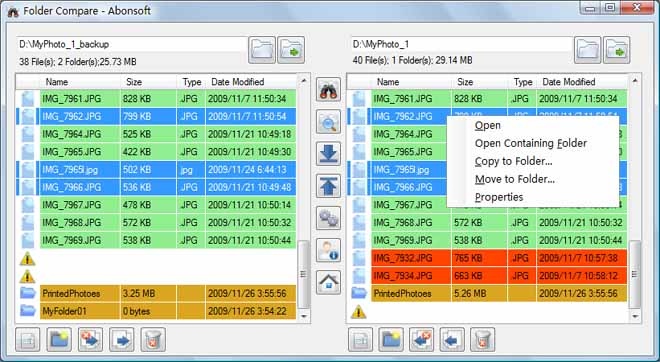
Abonsoft Folder Compare is powerful and easy-to-use folder comparison software. You can easily find all your different files/folders. And you can easily copy/move them to another side or to any folder of your computer. You can also delete them into your recycle bin and may restore them later. Just by clicking on the file/folder rows, you can view their property windows or open them. Folder synchronizing becomes easier and faster!
Key features include:
Support dragging - just drag in two folders, then to compare
Easily copy or move files or folders to another side or to any folder
Delete files or folders into your Recycle Bin and they can be restored
Find your next or previous different file or folder easily
Rename a file or a folder easily
Create a new folder easily
Compare sub-folders easily
Show different compare results in your customized color
The modified date of files and folders can be sensitive or not to compare
Can calculate the sizes of folder and subfolder based on your settings
Show the property windows of files and folders by just double clicking a row
Open the files and folders by just double clicking the row icon
Right click on the selected files or folders to show menus for more actions
About Abonsoft Folder Compare
This File & Disk Management program is available in English. It was last updated on 29 September, 2026. Abonsoft Folder Compare is compatible with the following operating systems: Windows.
The company that develops Abonsoft Folder Compare is Abonsoft Inc.. The latest version released by its developer is 1.0.151203. This version was rated by 6 users of our site and has an average rating of 2.2.
The download we have available for Abonsoft Folder Compare has a file size of N/A. Just click the green Download button above to start the downloading process. The program is listed on our website since 2015-12-03 and was downloaded 351 times. We have already checked if the download link is safe, however for your own protection we recommend that you scan the downloaded software with your antivirus. Your antivirus may detect the Abonsoft Folder Compare as malware if the download link is broken.
How to install Abonsoft Folder Compare on your Windows device:
- Click on the Download button on our website. This will start the download from the website of the developer.
- Once the Abonsoft Folder Compare is downloaded click on it to start the setup process (assuming you are on a desktop computer).
- When the installation is finished you should be able to see and run the program.
Program Details
System requirements
Download information
Pricing
Version History
version 1.0.151203
posted on 2015-12-03
folder compare, folder synchronization, file folder compare, file property, folder property, sub-folder compare, file and folder copy, move, delete
